What is a Multifunction Printer? Features, Benefits & Use Cases Explained
Published: 16 Feb
A multifunction printer (MFP) is a single device that combines printing, scanning, copying, and often faxing into one machine. Instead of using separate devices for each task, businesses use multipurpose printers to centralise document management, reduce costs, and improve workflow efficiency. MFPs are widely used in modern offices because they simplify everyday document tasks while saving space and resources.
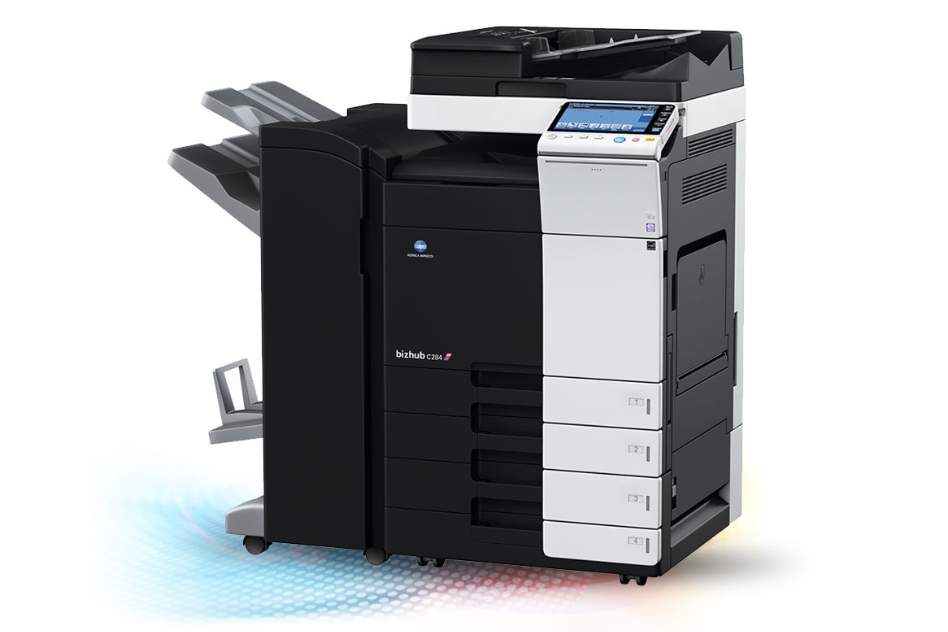
In this blog, we go into detail to answer the common question “What is a multifunction printer?” and share everything you need to know about this type of printer.
What Does a MFP Printer Do?
An MFP printer performs several essential office functions within one device:
- Printing – Produces black-and-white or colour documents
- Scanning – Converts physical documents into digital files
- Copying – Creates duplicates without needing a computer
- Faxing – Sends documents via phone line (still required in some industries)
- Email-to-Scan – Sends scanned files directly to email addresses
- Cloud Connectivity – Integrates with platforms like Google Drive or SharePoint
- Duplex Printing – Automatically prints on both sides of paper
- Document Finishing (on advanced models) – Stapling, hole punching, booklet creation
Modern MFPs often include touchscreen interfaces, wireless connectivity, and user authentication features for secure printing.
How Does a Multipurpose Printer Work?
A multifunction printer works by integrating the core components of a printer, scanner, copier, and fax machine into a single system.
Inside the device, you’ll typically find:
- A print engine (laser or inkjet technology)
- A scanner unit with light sensors
- Paper trays and rollers
- A processing board that manages jobs
- Network connectivity hardware
In a laser-based MFP, static electricity attracts toner to paper, and heat fuses the toner permanently.
When scanning, a light passes over the document while sensors capture the image and convert it into a digital file.
All of these processes are coordinated through built-in software, allowing users to switch between functions quickly and efficiently.
What Is an Advantage of a Multifunction Printer?
MFP printers offer several major advantages for businesses of all sizes.
Saves Space in the Office
Instead of housing separate printers, scanners, copiers, and fax machines, one MFP handles all functions. This is especially valuable in small or shared office environments.
Reduces Equipment & Running Costs
Managing one device instead of several lowers:
- Hardware investment
- Maintenance contracts
- Energy consumption
- Consumable management (ink or toner)
Over time, this can significantly reduce overall operating costs.
Improves Office Productivity
Employees can complete document tasks in one location without moving between machines. Features like scan-to-email, cloud access, and automatic duplex printing help speed up everyday workflows.
Simplifies IT & Maintenance
IT teams only need to install drivers, apply updates, and troubleshoot a single device. This reduces complexity and makes device management easier.
Multipurpose Printer vs Single-Function Printers
Here’s how MFPs compare to standard printers:
MFP Printer:
- Prints, scans, copies, and often faxes
- Saves physical space
- Centralised device management
- Ideal for shared office use
- Higher upfront cost but greater overall value
Single-Function Printer:
- Only prints
- Requires separate scanner and copier devices
- Lower initial cost
- Suitable for home use or very low print volumes
Types of Multipurpose Printers
There are different types of multipurpose printers designed to suit various business environments.
Desktop Multifunction Printers
Desktop MFP printers are compact and designed for small teams or home offices. They handle lower print volumes and fit comfortably on desks or small cabinets.
Best for:
- Startups
- Home offices
- Small teams (1–5 users)
Office Multifunction Printers
Office Multifunction printers are larger, floor-standing machines built for higher print volumes and multiple users. They often include advanced finishing options and stronger security features.
Best for:
- Medium to large businesses
- Departments with heavy document usage
- Corporate environments
Laser vs Inkjet Multifunction Printers
Laser MFPs
- Use toner instead of ink
- Faster printing speeds
- Lower cost per page for high volumes
- Ideal for busy offices
Inkjet MFPs
- Use liquid ink
- Typically lower upfront cost
- Excellent color quality
- Suitable for low to moderate print volumes
Common Use Cases for MFP Printers
MFP printers are common in a range of sectors, such as:
Small Offices & SMEs
Provide cost-effective document management without requiring multiple devices.
Corporate Offices
Support large teams with high-speed printing, advanced security, and workflow automation.
Education
Used for printing coursework, scanning assignments, and administrative tasks.
Healthcare
Essential for scanning patient records, printing prescriptions, and handling secure documentation.
Professional Services (Legal, Finance)
Ideal for high-volume printing, copying contracts, and secure document storage.
Are Multifunction Printers Right for Your Business?
Choosing the right printer depends on several factors:
Office Size
Larger teams benefit from office-grade multifunction printers, while smaller teams may only need a desktop model.
Print Volume
Businesses with high monthly print volumes typically benefit from laser MFPs with lower cost per page.
Security Needs
If your organisation handles sensitive data, look for secure print release, user authentication, and encrypted scanning.
Remote / Hybrid Working
Cloud printing and scan-to-email capabilities support flexible and hybrid work environments.
If you’re unsure which option fits your needs, consider arranging a professional print audit to assess your current setup and identify potential cost savings.
Contact the team at Apple Office Equipment to organise your free print audit today.
Frequently Asked Questions About Multifunction Printers
Q: What is a multifunction printer used for?
A: A multifunction printer is used for printing, scanning, copying, and sometimes faxing documents in one integrated device.
Q: Is an MFP printer the same as an all-in-one printer?
A: Yes. The terms “multifunction printer” and “all-in-one printer” are generally interchangeable, though MFP is more commonly used in business settings.
Q: Are MFP printers suitable for small offices?
A: Yes. Desktop models are specifically designed for small offices and home-based businesses.
Q: Do multipurpose printers save money?
A: In many cases, yes. They reduce hardware, maintenance, and energy costs while improving operational efficiency.
Q: What is the difference between a multipurpose printer and a standard printer?
A: A multipurpose (multifunction) printer performs multiple document tasks, while a standard printer only handles printing.
Still have questions about what a Multifunction Printer is? Contact our team of experts and we can explain further. Call us on 02380 330611.
